WoW Macro Generator: Build & Copy Perfect Macros in Seconds
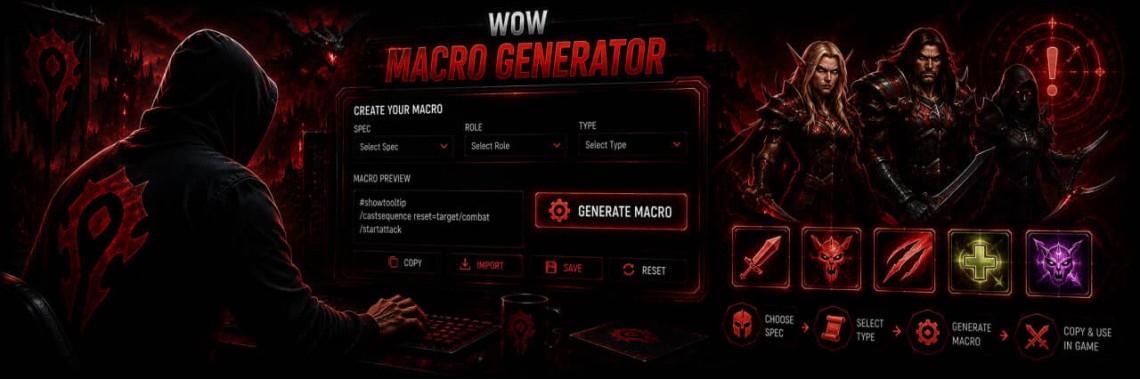
Table of Contents
- How to Use the WoW Macro Generator
- What Makes This Macro Generator Different
- Supported Actions
- Macro Conditionals Reference
- Bonus Macro Recipes
- Set Mouseover as Focus
- Clear Focus
- Pet Attack + Ability Together
- WoW Macro Generator FAQ
- What is the character limit for a WoW macro?
- What is the difference between /cast, /use and /equip?
- Why does only one of my two Abilities ever activate?
- What is a mouseover macro and why use one?
- What does a Focus target do in a macro?
- What is the difference between Together and Sequential macros?
- What does reset= do in a castsequence macro?
- Can I use one button for two different spells with a modifier key?
- Are macros allowed in World of Warcraft, and can I get banned for using them?
- Do these macros work in WoW Classic and every retail expansion?
- Why does my macro's icon show a question mark?
- Can I combine an item and an ability in the same macro?
Building a World of Warcraft macro usually means guessing at bracket syntax, forgetting a comma, or blowing past the 255-character limit and not knowing why the macro silently stopped working. The GRAMBL WoW Macro Generator below builds the exact macro text for you: pick Abilities, Items or Equipment, choose who they target and under what conditions, and copy the finished macro straight into WoW's macro editor.
How to Use the WoW Macro Generator
- Pick a ready-made preset above, or click "+ Add Another Action" to start from scratch.
- For each action choose Ability (/cast), Item (/use) or Equipment (/equip), then type its exact in-game name.
- Set a Target (Mouseover, Focus, Current Target, and more) and open "More conditions" for combat, reaction, life and location conditions.
- Choose Together (everything fires on one press) or Sequential (advances one step per press, /castsequence).
- Copy the generated macro, open your in-game macro editor with /macro, paste it in, and drag the icon onto your action bar.
What Makes This Macro Generator Different
Most macro generators only chain conditions blindly and leave you to discover the bugs in combat. This one is built on top of how WoW's macro engine actually resolves commands: it automatically merges multiple Abilities or Equipment swaps into a single priority chain (since only the first true condition in a command ever fires), keeps independent Item uses on their own lines so trinkets and cooldowns really do go off together, and warns you the moment you build something that would silently fail - like two unconditioned Abilities competing for the same button.
Supported Actions
| Action Type | Command | Typical Use |
|---|---|---|
| Ability | /cast | Spells, class abilities, racials cast with a GCD or instantly |
| Item | /use | Trinkets, potions, Healthstone, PvP trinket, engineering gadgets |
| Equipment | /equip | Weapon and gear swaps, such as switching to a shield for a defensive cooldown |
Macro Conditionals Reference
These are the building blocks the generator uses under the hood when you set Target, Modifier and the extra conditions in "More conditions." Understanding them helps you fine-tune the output by hand if you want to go further than the builder.
| Conditional | Meaning |
|---|---|
| @target, @focus, @mouseover, @player, @cursor | Temporarily aims this one command at a specific unit, without changing your actual target |
| help / harm | The unit can be helped (friendly) or attacked (hostile) |
| dead / nodead | The unit is dead, or is alive |
| exists / noexists | A valid unit is present, or is not |
| mod:shift, mod:ctrl, mod:alt | True only while that modifier key is held down |
| combat / nocombat | You are in combat, or you are not |
| indoors / outdoors | You are inside a building/instance, or outside in the open world |
| stealth | You are currently stealthed |
| mounted | You are currently on a mount |
| flying | You are mounted or in a flight form and airborne |
| swimming | You are currently underwater |
A macro reads its conditions left to right and stops at the first one that is true - this is why stacking two Abilities with no conditions at all never works as expected, and why the generator will warn you when it spots that pattern.
Bonus Macro Recipes
A few useful patterns that sit outside what the builder covers directly - copy these as-is or adapt the names to your own spells.
Set Mouseover as Focus
/focus [@mouseover,exists]
Hover over any unit and press the button to lock it in as your Focus, so you can track or target it separately from your main target.
Clear Focus
/clearfocus
Drops your current Focus target so you can set a new one.
Pet Attack + Ability Together
#showtooltip
/petattack
/cast Cobra Shot
Sends your pet in and fires your ability on the same press - handy for Hunters, Warlocks and Death Knights.
WoW Macro Generator FAQ
What is the character limit for a WoW macro?
Every macro is limited to 255 characters, including the #showtooltip line, spaces and punctuation. The generator's live counter shows exactly how much room you have left as you build.
What is the difference between /cast, /use and /equip?
/cast triggers a spell or class ability, /use activates an item such as a trinket or potion, and /equip switches a piece of gear. They behave differently inside a macro: multiple /use lines for different items can all fire on the same press, while /cast and /equip only ever resolve to one final action per press, which is why the generator merges those into a single priority chain automatically.
Why does only one of my two Abilities ever activate?
A macro executes the first Ability whose condition evaluates to true and stops there. Two unconditioned Abilities in the same macro will always resolve to the first one - give the second a Modifier (like Shift) or a condition (like combat or a target type) so the macro can tell them apart.
What is a mouseover macro and why use one?
A mouseover macro applies an Ability to whatever unit your mouse cursor is currently over, without changing your selected target. It's the standard way healers heal party members from a raid frame and how many classes interrupt or dispel without breaking their current target.
What does a Focus target do in a macro?
Focus lets you lock in a second target separate from your main one, which macros can then reference with @focus. It's commonly used in PvP to track a healer or kill target while still fighting whoever you have targeted normally.
What is the difference between Together and Sequential macros?
Together builds a macro where every action fires on the same button press, using conditions to decide which one applies. Sequential uses /castsequence to advance through a fixed list of Abilities one step at a time, moving to the next Ability each time you press the button.
What does reset= do in a castsequence macro?
Reset controls when the sequence jumps back to its first step. Common options are resetting when you change target, when you leave combat, when you hold Shift, or after a fixed number of seconds without pressing the macro again.
Can I use one button for two different spells with a modifier key?
Yes. Set one action with no modifier and a second action with Shift, Ctrl or Alt selected as its modifier - the generator writes the modified action first so it takes priority whenever that key is held, falling back to the unmodified action otherwise.
Are macros allowed in World of Warcraft, and can I get banned for using them?
Macros are a built-in Blizzard feature and are fully allowed. They combine and condition existing actions you could already perform manually - they don't automate combat decisions or play the game for you, which is what separates them from a scripting bot or a banned automation addon.
Do these macros work in WoW Classic and every retail expansion?
Yes. The commands and conditionals used here - /cast, /use, /equip, /castsequence and the bracket conditions - are part of WoW's core macro system and function the same way across Classic and every retail expansion, aside from spell names changing between versions.
Why does my macro's icon show a question mark?
Add a #showtooltip line (the generator does this automatically in Auto mode) so the macro icon and tooltip match your first Ability or Item. Without it, WoW shows a generic question-mark icon since it can't guess which action to represent.
Can I combine an item and an ability in the same macro?
Yes - this is one of the most common macro patterns, typically used to pop a trinket and a cooldown together. Add both actions in Together mode and they'll fire on the same key press.
Need your character carried through the content these macros are built for? GRAMBL's World of Warcraft boosting services cover Mythic+, raids and PvP rating with fast, professional boosters.
Tags: Tools, Utilities, Generators, World of Warcraft, Blizzard, Battle.net
Newest Articles



Most Popular
-
 How to Fix LUA Errors in WoW: Ultimate Troubleshooting Guide
478 views
How to Fix LUA Errors in WoW: Ultimate Troubleshooting Guide
478 views
-
 How to Change Your Battle.net Region | Account Country Update Guide
216 views
How to Change Your Battle.net Region | Account Country Update Guide
216 views
-
 WoW Performance Boost: How to Fix Lag, FPS Drops & Stuttering
118 views
WoW Performance Boost: How to Fix Lag, FPS Drops & Stuttering
118 views
-
 How to Fix Battle.net Error BLZBNTTAS00000006: Account Unlock Guide
99 views
How to Fix Battle.net Error BLZBNTTAS00000006: Account Unlock Guide
99 views
-
 WoW Console Commands: Complete Guide to Graphics, Camera, and Interface Settings
90 views
WoW Console Commands: Complete Guide to Graphics, Camera, and Interface Settings
90 views